


By Marcus Vega, Tech & Lifestyle Writer · 9 min read
On the Timebox Evo — Divoom's Portable Pixel Art Speaker:
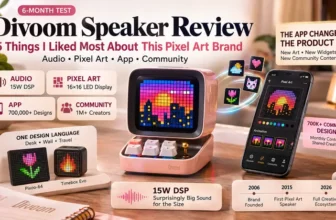
“The Divoom Timebox Evo is a pixel art Bluetooth speaker with a 16×16 LED display app controlled front screen. The Timebox Evo features cool animation frame and gaming room setup capabilities, bedside alarm clock functionality, and serves as a creative portable mini speaker. The 256 programmable LED panel can display pixel art animations, clock faces, weather data, social media notifications, and custom text — all synchronized with your music via a visual equalizer. It represents Divoom's commitment to making portable technology that is both functional and emotionally engaging.”
— Divoom, from the official Timebox Evo product description (Newegg / divoom.com)
On Why Portability Changes the Use Case:
“People were not just using Divoom devices to display pixel art. They were making them part of their daily rituals — alarm clocks, mood lighting, gaming setups, travel companions. The Timebox Evo was built for people who wanted the Divoom experience everywhere, not just at their desk. At 3.9 inches square and small enough for a jacket pocket, it brings pixel art, smart features, and Bluetooth audio to every room you walk into.”
— Divoom, from “The Divoom Story” brand history page and product positioning (divoom.com)
The Pocket-Sized Pixel Speaker That Goes Everywhere I Go
I already owned the Ditoo for my desk and the Pixoo-64 for my wall. The Timebox Evo was supposed to be the “portable one” — the Divoom I'd throw in a bag when I traveled. What I didn't expect was for it to become the one I use the most. Not because it's the best-sounding (the Ditoo is louder). Not because it has the most impressive display (the Pixoo-64 wins there). But because it's always where I am — bedside at night, kitchen counter in the morning, backpack for work trips, bathroom shelf during showers.
The Timebox Evo is the Divoom product for people who don't want a desk setup — they want the pixel art experience to follow them through their day. At approximately $40–60, it's also the most affordable entry into the Divoom ecosystem. Here are the six features that make it worth upgrading from the older Timebox Mini — or worth choosing as your first Divoom product if portability matters more than desk presence.
What Is the Divoom Timebox Evo?
The Divoom Timebox Evo is a portable Bluetooth speaker with a 256-LED programmable pixel art panel arranged in a 16×16 matrix. It measures 3.9 × 1.5 × 3.9 inches — essentially a cube small enough to slide into a jacket pocket — and weighs approximately 255g. The “Evo” designation indicates it's the upgraded version of the original Timebox, with improvements in LED brightness, audio quality, Bluetooth version (5.0), and app integration.
Inside the compact frame: a ~6W speaker driver, Bluetooth 5.0 connectivity, a microphone for hands-free calls, 6–8 hours of battery life, and the same Divoom app connection that powers all their products — with access to 700,000+ pixel art designs and the full suite of smart features (alarm, weather, notifications, DJ mixing, white noise, sleep timer). Available at divoom.com, Amazon, Walmart, and Newegg.
🔊 Divoom Timebox Evo — At a Glance
6 Features That Make It Worth the Upgrade
① The 256-LED Panel Turns a Portable Speaker into a Visual Companion
Every portable Bluetooth speaker under $60 sounds roughly similar — they all play music, they all connect via Bluetooth, they all have a battery. The Timebox Evo's LED panel is the feature that breaks it out of the commodity trap. The 16×16 matrix (256 LEDs displaying 16 million colors) shows pixel art animations, clock faces, weather icons, and custom designs — all from the same Divoom app and 700,000+ community library that powers the Ditoo and Pixoo. On my nightstand, the Timebox Evo displays a gradual sunrise clock face that transitions from deep blue to warm orange as morning approaches. In my kitchen, it shows the weather and time while I make coffee. In my bag during travel, it's the alarm clock I trust to wake me in a hotel room without depending on my phone. The LED panel transforms the Timebox from “another Bluetooth speaker” into something no other portable speaker offers: a tiny visual companion that's functional and beautiful simultaneously.
② The Smart Alarm Replaced My Phone as My Wake-Up Device
This is the feature that made the Timebox Evo my most-used Divoom product. The smart alarm is configurable through the app: you set a wake time, choose an alarm tone (or gradual music fade-in), and the LED panel can display a pixel art sunrise animation that brightens gradually in the minutes before the alarm sounds. The effect is significantly gentler than a phone alarm — a soft visual brightening combined with gradually increasing audio. Because it's not my phone, I don't immediately start scrolling when I reach for it. The alarm turns off with a button press on the speaker. I check the pixel weather display, see if it's raining, and start my morning — all without touching my phone for the first 15 minutes. That separation between “alarm device” and “infinite distraction device” has genuinely improved my morning routine. The Timebox Evo costs less than most alarm clocks designed for this purpose — and it's also a Bluetooth speaker, pixel art display, and everything else.
③ Social Media Notifications on the LED Panel Keep Me Informed Without My Phone
The notification feature displays incoming message icons on the LED panel — a pixel-art-styled app icon appears when you get a notification from Instagram, WhatsApp, Messenger, email, or other configured apps. It doesn't show the message content (it's a 16×16 display, not a screen), but it tells you which app has a new notification without you needing to check your phone. This sounds minor until you realize how often you pick up your phone “just to check” and end up scrolling for 15 minutes. The Timebox Evo sitting on my desk shows a little pixel Instagram icon when a DM arrives. I can decide to check it now or later — but the decision happens by glancing at a cute pixel icon on my desk, not by unlocking my phone and being ambushed by every other notification and app simultaneously. It's a small feature with a disproportionately large impact on attention management. I now keep my phone face-down during work sessions and let the Timebox handle notification awareness.
④ The DJ Mixing Tool Is Unexpectedly Fun
I discovered this feature accidentally while exploring the Divoom app. The DJ mode provides virtual turntables, beat pads, and sound effect triggers on your phone — all playing through the Timebox Evo in real time. The LED panel syncs with the audio, displaying a pixel art equalizer that pulses and dances with the beats. Is it a professional DJ tool? Absolutely not. But at a small gathering, handing someone your phone and letting them “DJ” through the Timebox is genuine entertainment. The tactile feedback of tapping beat pads while watching the pixel equalizer respond creates a surprisingly engaging experience. I've used it at three dinner parties — each time, someone spent 20+ minutes playing with it. The feature exists because Divoom understands that their products are meant to entertain, not just function. The DJ mode is a perfect example of a feature that nobody would list as a purchase reason but becomes a favorite party trick after you discover it.
⑤ The Weather and Clock Dashboard Earns Its Desk Space
The Timebox Evo can display the current weather as a pixel art scene — rain shows animated drops, sun shows a glowing pixel sun, clouds drift across the display. The time alternates or co-displays with the weather. Together, they create a functional dashboard that's more visually engaging than checking your phone's weather app. I keep the Timebox Evo on my kitchen counter in the morning showing weather + time. A glance tells me whether I need an umbrella, how cold it is, and what time I need to leave — all rendered in charming pixel art rather than boring text. This is one of those features where the practical utility is the same as a phone widget, but the emotional experience is entirely different. Checking the time on your phone is a transaction. Glancing at an animated pixel art clock face on a glowing cube is a small moment of visual pleasure. Over months of daily use, those small moments add up to something meaningful — your environment feels more intentional, more curated, more alive.
⑥ At ~$40–60, It's the Most Affordable Way Into the Divoom Ecosystem
The Ditoo costs $50–90. The Pixoo-64 costs $80–100+. The Timebox Evo sits at $40–60 — the lowest entry point for a full-featured Divoom device. And despite the lower price, it connects to the same app, the same 700,000+ design community, the same smart features, and the same creative tools as the more expensive products. The audio is smaller (6W vs 15W on the Ditoo) and the design is less dramatic (cube vs retro computer). But the pixel art experience, the alarm functionality, the notification system, the DJ mixing, and the weather dashboard are all present and work identically. If you're “Divoom-curious” — you've seen the brand on social media, you're intrigued but not sure if it's for you — the Timebox Evo is the lowest-risk, lowest-cost way to experience the ecosystem. If you love it, you'll eventually want a Ditoo for your desk or a Pixoo for your wall. If it's not for you, you're out $40–60 instead of $80–100. It's the sampler plate of the Divoom menu.
256-LED panel. Smart alarm. DJ mixing. Weather dashboard. Pocket-sized. $40–60.
Divoom Timebox Evo — the most affordable way into the pixel art ecosystem that follows you everywhere.
My 4-Month Experience
🌙 Primary Use: Bedside Alarm + Sleep Companion
The Timebox Evo lives on my nightstand 5 nights a week. Sleep timer plays white noise (rain setting) for 30 minutes as I fall asleep. The display dims to a barely visible clock face overnight. In the morning, the gradual sunrise animation + alarm wakes me without the phone-grabbing habit. After four months, my screen time in the first hour of waking has dropped noticeably — because my alarm is no longer the device that also has Instagram, email, and news.
✈️ Secondary Use: Travel Speaker + Hotel Alarm
On work trips (two per month), the Timebox Evo goes in my backpack. In hotel rooms, it serves the same bedside function — alarm, white noise, ambient pixel art — but also plays podcasts while I unpack and music while I get ready. It's small enough to not take up luggage space but functional enough to replace the generic hotel alarm clock, the phone's music player, and the ambient noise app. One device, three functions, pocket-sized.
🍳 Tertiary Use: Kitchen Counter Dashboard
On mornings when I'm home, the Timebox Evo moves from the nightstand to the kitchen counter. It shows the weather (pixel art rain or sun), the time, and plays morning playlists while I cook breakfast. The built-in mic means I can take calls hands-free while cooking. After four months, the Timebox Evo has become the most nomadic device in my apartment — it moves with me through my daily routine rather than sitting in one place. That mobility is its defining trait.
What It Does Well
- True portability: 3.9″ cube, 255g — fits in a jacket pocket, backpack side pocket, or nightstand without dominating space.
- Smart alarm that replaces your phone: gradual sunrise animation + audio fade-in = gentler wake-up without triggering a phone scrolling habit.
- Full Divoom ecosystem access at the lowest price: same app, same 700K+ designs, same smart features as the $90 Ditoo — at $40–60.
- Notification awareness without phone dependency: pixel art app icons on the LED panel let you know when something arrives without unlocking your phone.
- DJ mixing is a genuine party trick: unexpectedly fun feature that turns the speaker into a casual entertainment device at gatherings.
- Weather + clock dashboard: practical daily utility rendered in charming pixel art — makes your morning glance a moment of visual pleasure.
- Built-in microphone: hands-free calls — useful in the kitchen, at a desk, or when your hands are occupied.
What Could Be Better
- 6W speaker is noticeably quieter than the Ditoo's 15W: fine for bedside, kitchen, and personal listening — but it won't fill a large room or power a party. For louder audio, the Ditoo is the better choice.
- Micro-USB charging instead of USB-C: in 2026, most devices have moved to USB-C. The Micro-USB port means carrying an extra cable on trips. A minor annoyance but a real one for the travel use case.
- The LED panel is 16×16 (same as Ditoo, less than Pixoo-64): at 256 pixels, the display shows simple icons and animations — not the detailed art possible on the Pixoo-64's 4,096 pixels. Manage visual expectations.
- No keyboard or joystick — no retro games: the Timebox Evo has no physical input beyond buttons. The retro gaming feature that makes the Ditoo so fun is absent here. All interaction is through the app.
- Battery at 6–8 hours is adequate but not exceptional: heavy LED use drains faster. For a device that's always on display, you'll charge it every 1–2 days. Acceptable for a portable speaker but noticeable compared to 10+ hour competitors.
Timebox Evo vs Competitors
| Feature | Timebox Evo ⭐ | JBL Go 3 | Divoom Ditoo | Anker Soundcore Mini |
|---|---|---|---|---|
| Pixel art display | ✅ 256 LEDs | ❌ | ✅ 256 LEDs | ❌ |
| Speaker power | ~6W | 4.2W | 15W | 5W |
| Portability | ⭐⭐⭐⭐⭐ Pocket-sized | ⭐⭐⭐⭐⭐ Ultra-portable | ⭐⭐⭐ Desk-first | ⭐⭐⭐⭐⭐ Pocket-sized |
| Smart alarm | ✅ Pixel art sunrise | ❌ | ✅ | ❌ |
| DJ mixing | ✅ | ❌ | ✅ | ❌ |
| Price | ~$40–60 | ~$30–40 | ~$50–90 | ~$20–30 |
The Timebox Evo occupies the “portable + pixel art + smart” sweet spot that no other speaker at this price touches. JBL Go 3 and Anker Soundcore Mini are cheaper, more portable, and waterproof — but offer zero smart features, zero pixel art, zero creative community. The Ditoo is louder, has retro games, and looks more dramatic — but it's desk-first, not pocket-first, and costs $10–30 more. For the specific need of “portable Divoom I can take everywhere,” the Timebox Evo is the right tool.
Who Should Buy the Timebox Evo
- People who want a bedside alarm that isn't their phone — the pixel art sunrise alarm + white noise + sleep timer is the standout use case.
- Frequent travelers who want a compact all-in-one — speaker + alarm + ambient noise + weather in a pocket-sized cube.
- Anyone “Divoom-curious” at the lowest price — full ecosystem access at $40–60. Try the brand without a $90 commitment.
- People who move devices between rooms — nightstand to kitchen to office throughout the day. Portability is the defining advantage. Available at divoom.com.
Who Should Skip It
- People who want maximum audio: the 6W driver is good for personal listening but won't fill a large room. Get the Ditoo (15W) for desk audio or a JBL for party-level volume.
- People who want retro games: the Timebox Evo has no joystick or keyboard — no Snake, no Tetris. The Ditoo is the gaming-capable Divoom.
- Anyone who wants a permanent desk centerpiece: the Timebox Evo's design is minimal and functional, not dramatic. The Ditoo's retro computer aesthetic is the desk statement piece.
- People who need waterproofing: the Timebox Evo is not water-resistant. For showers or pools, get a JBL Go 3 or Divoom Voombox.
⭐ Final Verdict: Divoom Timebox Evo
Six features, one defining trait: the Timebox Evo is the Divoom that follows you. The LED panel makes it more than a speaker. The smart alarm makes it better than a phone for waking up. The notification display keeps you informed without the distraction trap. The DJ mixing is an unexpected party bonus. The weather dashboard is daily utility wrapped in pixel charm. And at $40–60, it's the cheapest way into the Divoom ecosystem.
The honest caveats: 6W won't fill a large room, Micro-USB is outdated, no games, and battery is adequate but not exceptional. But for the use case it's designed for — a portable pixel art companion that serves as alarm, speaker, dashboard, and creative device across every room you walk into — the Timebox Evo is the best $40–60 you can spend on a portable speaker that does more than just play music.
Rating: 4.3 / 5.0 — Available at divoom.com.
Pocket-sized. 6 features. $40–60. The Divoom that goes everywhere you go.
Divoom Timebox Evo — alarm, speaker, dashboard, pixel art, DJ mixing, notifications. All in your pocket.
Frequently Asked Questions
What is the Divoom Timebox Evo?
Portable Bluetooth speaker with 256-LED pixel art panel (16×16). ~6W speaker, BT 5.0, 6–8h battery, built-in mic. Smart alarm, weather, notifications, DJ mixing, white noise. 3.9″ cube, pocket-sized. ~$40–60. Connects to Divoom app (700K+ designs).
What's the difference between Timebox Evo and Timebox Mini?
Evo = upgraded version: brighter LEDs, better audio, BT 5.0 (vs 4.0), longer battery, enhanced app features (DJ mixing, better notifications). The Mini is older/discontinued. Buy the Evo for current-gen quality.
How does it compare to the Ditoo?
Ditoo = desk-first (15W, retro design, games, keyboard). Timebox Evo = portable-first (6W, cube, pocketable, travel). Same app, same community. Ditoo for desk presence; Timebox Evo for portability.
Is the sound quality good?
Good for its size (~6W). Fills a bedroom/bathroom. Clear vocals for podcasts and calls. Bass present but not heavy. Not party-level loud — for that, get the Ditoo (15W) or a dedicated speaker.
What is the DJ mixing feature?
Virtual turntables + beat pads in the Divoom app, playing through the speaker in real time. LED panel syncs as a visual equalizer. Casual entertainment — not professional, but surprisingly fun at gatherings.
How long does the battery last?
6–8 hours (LED on, moderate volume). Audio-only mode extends life. Charges via Micro-USB. Sufficient for a full day of bedside use or a weekend trip.
Is it worth upgrading from the Mini?
Yes — brighter LEDs, better sound, BT 5.0, more app features. The Evo is the current-gen model Divoom actively supports. At $40–60, it's the right buy for anyone entering or upgrading within the Divoom ecosystem.
Where can I buy the Timebox Evo?
At divoom.com (official store), Amazon, Walmart, Newegg. ~$40–60.


 Top Picks