

By Marcus Vega, Tech & Lifestyle Writer · 9 min read
On Why Pixel Art Displays Are More Than Decorations:
“Unlike traditional displays that remain the same after purchase, Divoom devices continue to receive new content from creators and the community. Every Divoom device becomes more personal over time. Use the Divoom App to update your display, explore new widgets, discover pixel art, customize themes, and keep your space feeling fresh every day. For years, creators have helped shape the Divoom ecosystem. Many of the platform's most loved experiences come directly from the community itself.”
— Divoom, from the official community page (divoom.com/pages/divoom-community)
On the Pixoo Line — From a Real User:
“I don't use it for the actual speaker but for the pixel art. The pixel art feature keeps you entertained for hours — creating your own pixel designs and animations, and the mini games and daily tools make it more than just a display. There's so much pixel art you can pick from, or even draw yourself if none of the hundreds of thousands of pixel arts doesn't tickle your fancy. You're getting a really good, dynamic, playful display for this price.”
— Verified customer reviews, compiled from Walmart and Amazon product listings for Divoom Pixoo products
I Hung a Pixel Art Frame on My Wall. Now Everyone Who Visits Asks About It.
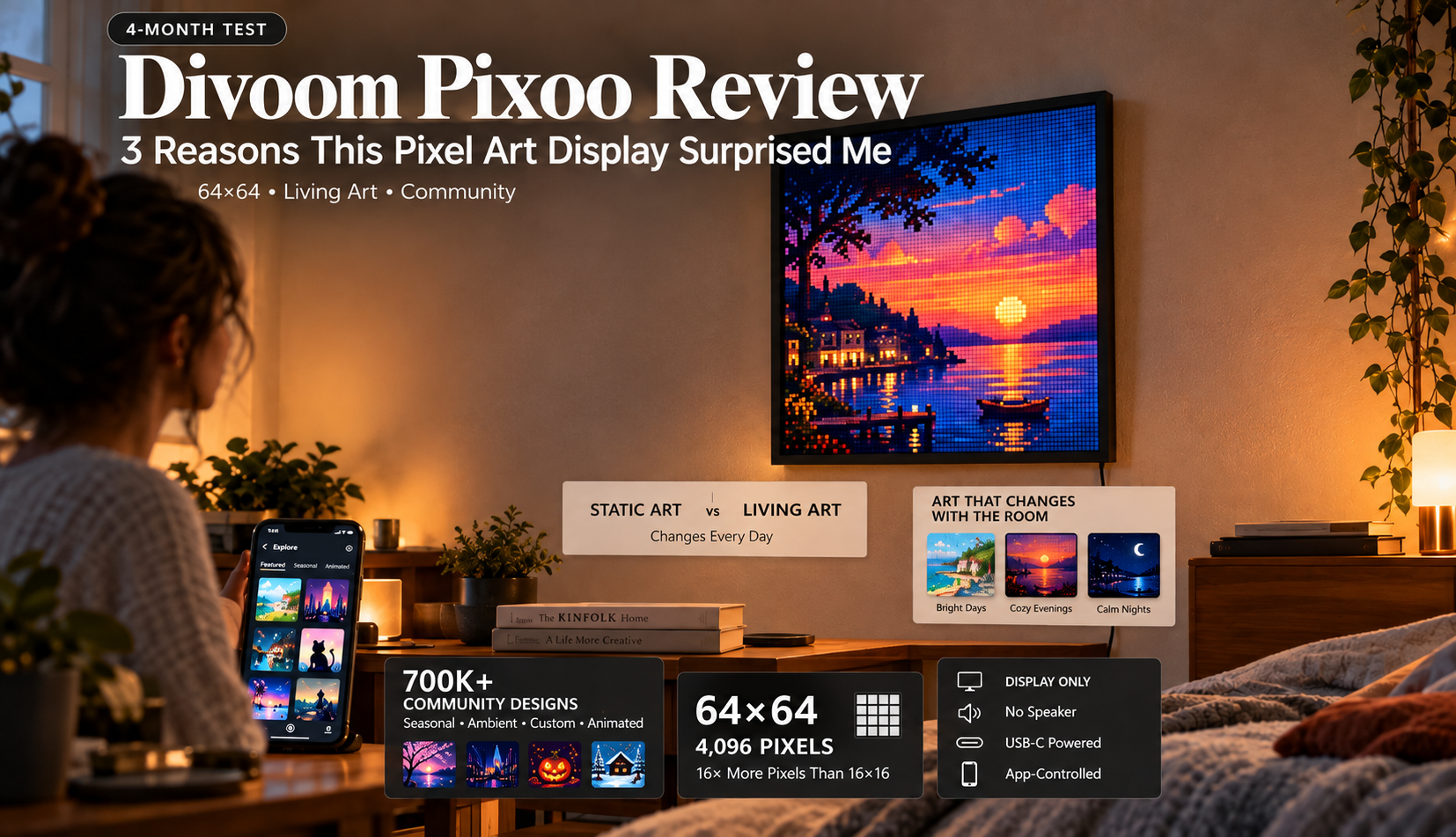
Four months ago, I ordered the Divoom Pixoo-64 expecting a novelty gadget — one of those tech products that's fun for a weekend, then collects dust in a drawer. What I didn't expect was for it to become the single most commented-on object in my apartment. Every person who walks in — friends, family, delivery drivers who glance past the door — asks the same question: “What is that?”
The answer: it's a 64×64 LED pixel art display that shows a different animation every time someone looks at it. Right now, it's cycling between a lo-fi girl working at a desk (animated, with steam rising from her coffee), a neon city skyline at night (cars moving, lights flickering), and a clock face that changes color with the time of day. It costs less than a framed print from a gallery — and unlike a print, it's never the same thing twice. Here are the three things that surprised me about the Divoom Pixoo after four months of daily use.
What Is the Divoom Pixoo?
The Divoom Pixoo is a pixel art digital display frame — a standalone LED screen designed to show pixel art animations, clock faces, weather data, notifications, and custom designs. Unlike the Divoom Ditoo (which is a speaker with a built-in display), the Pixoo is purely visual — no speaker, no joystick, no keyboard. It focuses entirely on the display experience, which means the screen is larger and higher-resolution than what you get on Divoom's speaker products.
The Pixoo comes in three resolution tiers: the base Pixoo (16×16 = 256 pixels, best as a desk clock), the Pixoo-Max (32×32 = 1,024 pixels, good for moderate detail), and the Pixoo-64 (64×64 = 4,096 pixels, the standout — detailed enough for genuinely impressive pixel art and smooth animations). All three connect to the Divoom app with access to 700,000+ community-created designs. Available at divoom.com, Amazon, Walmart, and Newegg.
🖼️ Divoom Pixoo Series — At a Glance
Pixoo (Base)
Resolution: 16×16 (256 pixels)
Best for: Desk clock, simple icons
Detail level: Low
Price: ~$40
Pixoo-Max
Resolution: 32×32 (1,024 pixels)
Best for: Moderate detail art
Detail level: Medium
Price: ~$60–80
Pixoo-64 ⭐
Resolution: 64×64 (4,096 pixels)
Best for: Wall art, detailed animations
Detail level: High
Price: ~$80–100+
3 Reasons This Pixel Art Display Surprised Me
① The 64×64 Resolution Transforms Pixel Art from Cute to Genuinely Beautiful
I own the Ditoo, which has a 16×16 display (256 pixels). At that resolution, pixel art is charming — simple icons, basic animations, cute clock faces. It's limited but lovable. Then I mounted the Pixoo-64 on my bedroom wall and the difference was staggering. 64×64 means 4,096 pixels — sixteen times the resolution of the Ditoo's display. At that density, pixel art stops being “simple” and becomes genuinely detailed. Animated cityscapes have depth — individual windows lit in different colors, cars moving on distinct roads, clouds drifting in layers. Character animations are expressive — facial features are visible, clothing has detail, gestures are readable. Nature scenes look like actual landscapes at a miniature scale — water reflects, trees sway, sunsets transition through color gradients that would be impossible at 16×16. The community designs created specifically for the 64×64 resolution are a tier above what the 16×16 community produces — the higher canvas attracts more skilled pixel artists who can create genuinely impressive work. My Pixoo-64 currently displays a rotating gallery of 12 community-created animations that I've curated over four months. Every one of them would look at home in a gallery or on a poster. The fact that they're rendered on a small LED matrix in my bedroom makes them feel more intimate and more alive than a screen on a wall.
② It's Living Art That Changes Every Day — and That's Why People Can't Stop Looking at It
I have paintings in my apartment. I have framed photographs. I've looked at them so many times that my brain has learned to ignore them — they're visual wallpaper, part of the environment, no longer noticed. The Pixoo-64 is different because it's never the same thing twice. Every morning, it's showing a different animation from my curated playlist. When I come home in the evening, it's transitioned to ambient mode — soft, slowly-moving patterns (ocean waves, geometric fractals, aurora borealis) that function as mood lighting and art simultaneously. On holidays, I load seasonal designs from the community — jack-o'-lanterns in October, snowfall in December, fireworks on New Year's. When I'm in a particular mood, I browse the community feed and find something that matches — lo-fi chill, cyberpunk energy, nature calm. A painting is frozen in time. The Pixoo is alive. It responds to my choices, changes with my moods, cycles through the seasons, and connects me to a community of creators who are constantly making new things to see. Four months in, I still glance at it every time I walk past — because every time, it might be showing something I haven't seen before. That constant low-level novelty is what makes static art feel dead by comparison. And it's what makes every visitor ask: “What IS that thing?”
③ Three Resolution Tiers Mean There's a Pixoo for Every Budget and Every Room
Most tech products offer one version at one price — take it or leave it. The Pixoo line's three-tier approach is smart because each resolution genuinely serves a different purpose:
Pixoo (16×16, ~$40) — best as a desk clock, nightstand display, or simple ambient light. At this resolution, think simple icons, basic animations, and clock faces. It's the entry point — affordable, functional, and a good test of whether you'll use the Divoom ecosystem before investing more.
Pixoo-Max (32×32, ~$60–80) — the middle ground. Enough resolution for moderately detailed pixel art and readable text. Good for a home office, kitchen counter, or bookshelf where you want visual interest without wall-mounting.
Pixoo-64 (64×64, ~$80–100+) — the statement piece. This is the one you mount on a wall. The one that makes visitors stop and ask questions. The one where the community's best pixel artists create genuinely impressive animations that function as living art. If you're buying one Pixoo, this is the one I'd recommend — the resolution leap from 16×16 to 64×64 is transformative, not incremental. My recommendation for most buyers: start with the Pixoo-64 if your budget allows. The visual impact is exponentially greater than the price difference. If budget is tight, the base Pixoo at $40 is a low-risk way to test the ecosystem — and you can always add the Pixoo-64 later when you see how much you use it.
Living art. 700,000+ designs. Changes every day. The wall art that never gets old.
Divoom Pixoo — from desk clock ($40) to gallery-worthy wall art ($80–100+). Connected to a global pixel art community.
My 4-Month Experience
📦 Week 1: Setup and First Impressions
Mounted the Pixoo-64 on my bedroom wall using 3M command strips (cleaner than screws, holds fine at this weight). Ran a USB-C cable along the wall edge to a nearby outlet. Setup via the Divoom app: 5 minutes. First display: a neon city skyline animation from the community feed. Immediate reaction: “this is so much more detailed than the Ditoo's 16×16.” Spent the next hour browsing community designs — downloaded 30+ animations and clock faces. Set up an auto-rotation playlist of my favorites. By the end of day one, the Pixoo-64 felt less like a gadget and more like a permanent feature of the room.
🎨 Month 1–2: Curating and Creating
Spent the first two months curating my playlist — now 45+ animations organized by mood (chill, energetic, ambient, seasonal). Created my first original 64×64 pixel art: a sunset over water that took about 40 minutes in the app's editor. The creation tools at 64×64 feel more like real digital art than the 16×16 tools — you have enough canvas to do meaningful composition and color work. The Pixoo rotates between a clock face during the day and ambient animations in the evening. Guests who stayed over both noticed and commented on the “wall display” — everyone wanted to know what it was and where to buy one.
🖼️ Month 3–4: Permanent Feature, Not a Gadget
By month three, the Pixoo-64 had become background infrastructure — like a lamp or a painting, except alive. I stopped actively thinking about it but kept glancing at it. Loaded Halloween-themed pixel art in October (animated pumpkins, haunted houses) — the seasonal rotation is one of the community's best features. Month four: still discovering new designs in the community feed. The platform's depth is remarkable — after four months, I've barely scratched the surface of 700,000+ designs. No sign of the novelty wearing off because the content pipeline is community-driven and constantly refreshing.
What It Does Well
- The Pixoo-64 resolution (4,096 pixels) enables genuinely impressive art: the leap from 16×16 to 64×64 is transformative — detailed scenes, smooth animations, readable text, expressive characters.
- Living art that never gets stale: community-driven content means new designs daily. Seasonal rotations, trending creations, monthly contests — the display evolves continuously.
- Three price/resolution tiers: entry at ~$40 (base Pixoo), mid at ~$60–80 (Pixoo-Max), premium at ~$80–100+ (Pixoo-64). Something for every budget.
- Conversation piece effect: the single most commented-on object in my apartment after four months. Visitors universally stop and ask about it.
- Functions as ambient lighting: at night, slow animations replace traditional nightlights with something infinitely more interesting.
- 700,000+ community designs: the content library is deep enough that four months of daily browsing hasn't exhausted it.
- Smart features (clock, weather, notifications): practical daily utility beyond just art display.
What Could Be Better
- No battery for wall use — USB-C required: the Pixoo needs constant power for continuous display. Wall mounting means routing a USB-C cable, which isn't as clean as a wireless frame. Cable management is the biggest practical compromise.
- No speaker: if you want audio + display, you need the Ditoo or Timebox Evo. The Pixoo is visual only. Not a weakness per se — it's by design — but buyers expecting a Ditoo-style all-in-one should know this is a pure display.
- The base Pixoo (16×16) is quite limited: at 256 pixels, it's essentially a simple clock or icon display. The magic happens at 32×32 and especially 64×64. Don't judge the Pixoo line by its entry-level model.
- Community quality is uneven: 700,000+ designs means plenty of amateur-quality uploads alongside the impressive work. You'll spend time filtering through lower-quality designs to find the gems. The “top rated” and “trending” filters help, but curation takes effort.
- App is essential — no standalone content management: without the Divoom app, the Pixoo shows whatever was last loaded. You can't browse or change content from the device itself. The app dependency is real.
Pixoo vs Other Pixel Art Displays
| Feature | Divoom Pixoo-64 ⭐ | Tidbyt | LaMetric Time | Samsung Frame TV |
|---|---|---|---|---|
| Resolution | 64×64 (4,096 pixels) | 64×32 | 37×8 LED strip | 4K (full TV) |
| Pixel art community | ✅ 700K+ designs, 1M+ users | Limited (developer community) | App-based widgets | Art Store (subscription) |
| Create your own art | ✅ Full editor in app | Developer tools | Limited | Upload photos/art |
| Pixel art aesthetic | ⭐⭐⭐⭐⭐ Built for this | ⭐⭐⭐⭐ Retro LED look | ⭐⭐ LED strip ticker | ❌ TV, not pixel |
| Price | ~$80–100 | ~$180 | ~$200 | $600+ |
The Pixoo-64 wins on pixel art community depth (700K+ designs vs limited alternatives), creation tools (full in-app editor), price ($80–100 vs $180–600+), and the pure pixel art aesthetic that it was designed for. Tidbyt is the closest competitor in the pixel display space but costs nearly 2x with a smaller community. LaMetric is more of a scrolling ticker than an art display. Samsung Frame TV is a full TV masquerading as wall art — beautiful but 6x the price and not pixel art by nature. For the specific use case of “pixel art display on my wall that connects to a creative community” — the Pixoo-64 is the clear winner at the best price point.
Who Should Buy the Pixoo
- Anyone who wants living wall art that changes every day — the Pixoo-64 is the most affordable way to put animated pixel art on your wall. It never gets stale.
- Gaming setup and desk setup enthusiasts — the pixel art aesthetic is perfectly at home in a PC gaming setup, streaming room, or curated workspace.
- Pixel art creators who want a physical canvas — the Divoom app's creation tools at 64×64 resolution feel like real digital art. Create, display, share.
- Gift buyers looking for something unique and memorable — the “what IS that?” factor is guaranteed with the Pixoo-64. Available at divoom.com.
Who Should Skip It
- Anyone who also wants a speaker: the Pixoo is display-only. If you want audio + display, get the Ditoo ($50–90) or Timebox Evo ($40–60).
- People who don't want to deal with cable routing: wall mounting requires a USB-C power cable. If clean wireless wall art is essential, the Pixoo isn't there yet.
- Minimalists who prefer blank walls: a glowing LED display is the opposite of “less is more.” If your aesthetic is intentionally bare, this isn't for you.
- Anyone who won't use the app: without the Divoom app, the Pixoo is a static display showing its last-loaded content. The living art experience requires the app.
⭐ Final Verdict: Divoom Pixoo
Three surprises, one clear recommendation: the Pixoo-64 is the product that made me understand what “emotional technology” means. The 64×64 resolution makes pixel art genuinely beautiful. The community-driven content means the display is never the same thing twice. And the three-tier pricing means there's an entry point for everyone. It's the cheapest way to put living art on your wall — and four months later, it's still the thing every visitor asks about first.
The honest caveats: USB-C tethering for wall use, no speaker, the base Pixoo is limited, and community quality is uneven. But for anyone who wants a display that creates, evolves, and makes their space feel more alive — the Pixoo is unlike anything else at any price. Start with the Pixoo-64 if budget allows. You won't regret it.
Rating: 4.6 / 5.0 — Available at divoom.com.
Living wall art. 4,096 pixels. 700K+ community designs. Changes every day. From $40.
Divoom Pixoo — the pixel art display that makes visitors ask “What IS that?” every single time.
Frequently Asked Questions
What is the Divoom Pixoo?
Pixel art digital display frame in 3 resolutions: 16×16 (256 px, ~$40), 32×32 (1,024 px, ~$60–80), 64×64 (4,096 px, ~$80–100+). App-controlled, 700K+ community designs. Clock, weather, notifications. Pure display — no speaker. USB-C powered. Wall or desk mount.
What's the difference between Pixoo, Pixoo-Max, and Pixoo-64?
Resolution: 16×16 (simple icons), 32×32 (moderate detail), 64×64 (detailed art, the standout). The Pixoo-64 is 16x the resolution of the base model. Get the 64 if budget allows — the visual leap is transformative.
Does the Pixoo have a speaker?
No — pure display. For audio + display, get the Ditoo (15W speaker + 16×16 display, $50–90) or Timebox Evo (speaker + 256 LED panel). The Pixoo focuses entirely on visual quality.
How do you hang it on a wall?
Wall mount bracket or 3M command strips (cleaner, no holes). Requires a USB-C cable for power — route along wall edge or behind furniture. Desk use: built-in stand included.
Is the Pixoo worth it?
The Pixoo-64: absolutely — it's living wall art at the price of a framed print, except it changes every day and connects to 700K+ designs. The base Pixoo: good as an entry point or desk clock, but limited at 16×16. The value scales dramatically with resolution.
Does it work without the app?
Shows last-loaded content without the app. But you need the Divoom app (free, iOS/Android/PC) to change content, browse community, create art, and configure smart features. Without it, ~80% of functionality is lost.
What can it display?
Pixel art animations (700K+ community designs), clock faces, weather, social media notifications, custom text, countdown timers, your own creations. Auto-rotates between multiple designs. Seasonal and trending content constantly refreshing.
Where can I buy the Divoom Pixoo?
At divoom.com (official store, bundles), Amazon, Walmart, Newegg. Base Pixoo ~$40, Pixoo-Max ~$60–80, Pixoo-64 ~$80–100+.


 Top Picks